
Brain Dump Notion Template for a calm and focused mind
Feeling tired from juggling all your thoughts?
I feel you.
In the past, this has always been a common theme of how I felt especially at bed time.
A time when I wish I had more time for the day.
And you know those moments when you wanted to focus on something, but you keep thinking of all the things?
You don’t want to think of them, but those thoughts are just there. Swimming around, creating endless swirling pattern, where there’s no beginning nor end.
I used to have them too.
But not anymore.
With my Brain Dump Page in Notion, I can clear my mind, capture any idea and give myself peace of mind.
And you can have that too.
You deserve a calm and clear mind, for sanity, productivity and peace of mind.
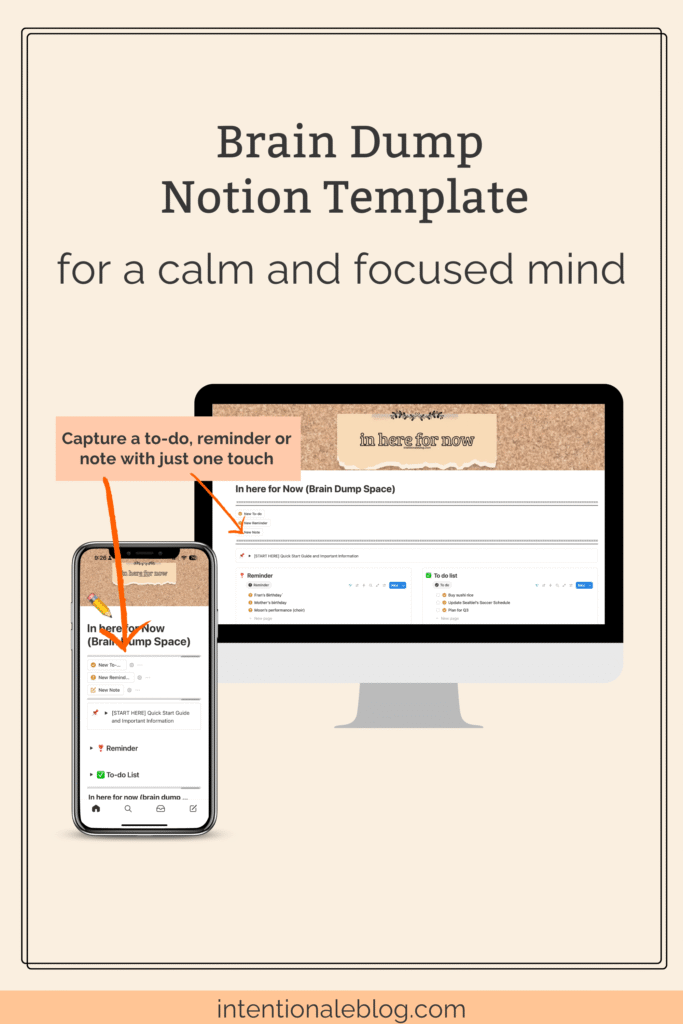
There’s a simple way to go from overwhelmed to in control, focused, and productive starting today.
DISCLOSURE:This post contains Affiliate Links which means I earn commissions at no cost to you, if you use those links to make purchases. And as an Amazon Associate, I earn from qualifying purchases. Read my Full Disclaimer here
Real changes with this Brain Dump Template
I’ve come a long way when it comes to managing the space in my head.
All thanks to Notion.
I am no longer running around like a headless chicken because my mind is much clearer now, well most of the time. And I don’t forget too many appointments and events anymore (as long as I took note of the correct date).
With the Brain Dump Notion Template:
- you will not lie awake at night anymore, thinking about your endless things to do
- no more worrying about forgetting something important
- you’ll have peace of mind knowing that ideas and thoughts are in one place, always ready when you need them
- you can finally enjoy your precious mental space for more creative thinking
Using the Brain Dump Notion template, you can capture every thought, task and idea the moment it hits.
Yes, no matter where you are and no matter what you’re doing.
You can use this notion template for fast mind sweeps on the go using your phone. Or when you want to do a focused brain dump session to clear your head and reset.
The design is intentional to keep things simple and friction-free so you can clear your mind any time without extra effort.
And this is what’s good about this.
When you capture anything, it automatically sorts them into a to-do, reminder or notes.
Not only that, everything you captured are placed in one main list where you can easily decide what to do with them, when you have more time later.

Benefits of using Brain Dump in Notion
There are lots of benefits of doing a brain dump in notion.
And if I have to only pick one to highlight, it would be peace of mind.
You’ll have peace of mind, knowing that you’ve captured anything and everything that’s potentially meaningful now and for later. Nothing will fall through the cracks.
And naturally you’ll achieve clear and focused mind every day.
This notion template is intentionally designed with simplicity and less friction, so you can capture (or take note) what’s on your mind in just a few seconds. You’ll have less mental clutter.
Designed with a one-click button, so that you can capture anything instantly. No matter how busy you are, nothing important gets lost.

It’s infused with a simple system (with less effort for you) so what you captured will be automatically organised into neat lists.
When you touch a button (depending which one of the three), two things happen.
One: If it’s a to-do or reminder, it is automatically added to the reminder list or the to-do list

Two: Whatever you captured is automatically added in the Main List which is neatly organised and sorted for you. This way, you can see easily see what’s in each category or type of thought.

I think it’s really cool. Hello intentional productivity, right?
Brain Dump vs. Mind Sweep: What’s the Difference?

For added clarity, let’s establish first what’s a brain dump and a mind sweep.
Both are mental decluttering strategies. The goal is simple: keep your mind clear so you can focus on thinking—not just remembering.
Brain dump and mind sweep are often used interchangeably and some people refer them as the same thing.
You can use these terms interchangeably too, but I find it helps to know the difference.
I always get confused when two words are similar but (slightly) different. So, I decided to have a clear definition of these words in a way I can easily understand and execute.
Mind sweep = quick capture anytime.
Brain dump = focused session.
I’ll give you a detailed explanation in a bit but the short answer to the question is:
MIND SWEEP is capturing ideas fast while you’re on the go or in the middle of something. The purpose is to capture your thought fast to avoid forgetting anything important.
BRAIN DUMP is done by setting aside a block of time to jot down all your thoughts. The purpose is to clear your mind and reset.
How to Do a Brain Dump
Doing a brain dump is the process of clearing your mind by writing down everything that’s in your head. It’s like cleaning out a full cupboard or a box that’s starting to look full and disorganised. The task is easy. Just take everything out.
So when you’re doing a brain dump, you’re emptying your head or externalising your thoughts.
Doing brain dump can be done digitally or analog style, depending on your preference.
Here are the 3 steps on how to do a brain dump.
- Pick a time (even just 5 minutes)
- Open your Brain Dump Notion Template and start capturing every thought, idea, to do, or reminders. No filter. Just capture all the things floating in your head
- Stop when the timer is up.
You can either leave it (for now and come back later) or you can continue sorting them out and take the next action.
Here is a sample of the brain dump I did while doing weekly review.

What to do after doing a brain dump
After doing a brain dump, you can either set aside what you captured, walk away and come back to it later.
Or you can just pause for a few minutes then do the next action steps.
Examples of the next actions:
- transfer any to do in your to-do list page (or wherever you keep all your master list of to do)
- schedule any appointment in your calendar
- transfer notes in your Notes Space or wherever you keep all your notes.
- go through your existing reminders, add the new ones or delete any reminder that’s not relevant anymore.
IMPORTANT
Make sure you go through your brain dump page regularly and process it (put things where they belong: see examples of next action above. ).
To get the most of your brain dumping session, make sure you do something with what you have collected.
- To-do : do it now or schedule and complete them
- Reminder: keep them until it becomes irrelevant then delete
- Notes : organise them by having one place for all your notes.
Mind Sweep: Quick Capture on the Go
Doing a mind sweep is a process of clearing your head when you’re on the go by quickly taking notes of any thoughts that pops in your head.
This is great when you’re in the middle of something and you thought of something that you want to remember.
No need to wait for the perfect time. Some ideas hit when you’re walking, cooking, or winding down.
When doing a mind sweep, try labelling your thought. They can be categorised into three.
- To-do – anything that requires action; something you need to do
- Reminder – anything related to an event or appointment
- Note – a reference for later; something you want to remember or reflect on
How to do a mind sweep.
When you’re doing something and something pops in your head, do these steps.
- Pause and take note or jot down whatever it is you want to remember for later
- Don’t overthink or organise, just capture
- Go back to whatever you’re doing.
When to do a mind sweep
Let me share with you when I do mind sweep.
When I’m cooking, walking, or doing household chores I briefly pause as soon as an idea or a thought hits.
This can be:
- Adding one or two items in my grocery list
- Capturing a reminder
- Taking notes of a thought and ideas that are potentially meaningful or useful for later.
A mind sweep can be done anytime without interrupting whatever you’re currently doing.
I do this on both paper and phone, whichever is accessible to me. When I am out and about, I do it on my phone and when I am in the bedroom during unplug hours, I use pen and paper.
Get my Brain Dump Notion Template here and enjoy having a clear mind every day.

How to use Brain Dump Notion Template
In recent years, I’ve discovered that one of the reasons I had a restless mind was because I didn’t clearly understand what was coming in and out of it. I knew they were thoughts, of course—but I wasn’t clear on what kind of thoughts they were.
With that realisation, I started giving them labels. And in the name of intentionality (I’ve been learning to simplify things), I decided to group them into three categories: to-do, reminder, and note (idea/thought).
A to-do is self-explanatory. A reminder relates to events or appointments. And anything else falls under the note category—an idea or thought worth remembering.
1. Decide which function to use
The key to your success in using the template is knowing when to use the buttons and when to use the Brain Dump Space.

2. Using the buttons
When you click any button, whatever you captured will be automatically organised and sorted for you.

3. Brain Dump Space Maintenance
The Brain Dump Notion Template was intentionally created to help you with just one thing. And that is to help you capture anything in your head when it hits no matter where you and what you’re doing.
As long as you have your phone with internet connection. You’re good.
This is not a to-do list manager or a reference keeper. Which means you need to make time to process what you captured.
I’m grateful for David Allen’s Getting things done method, where I learned the concept of mind sweep and processing what I captured.
If it’s a to-do, you need to either set aside time to do that thing or batch them and schedule a time to get them done.
A reminder you captured (for an event or appointment) needs to be in your calendar. You may also need to make a plan or prepare what you’ll need for that event or appointment.
For the notes (ideas/thoughts), you captured, you need to place them in one space with all your other notes. You can create a new page and call it “Reference” and place here all your notes there. That way, you know where to look for our notes when you need them.
Wrapping it up
If you don’t have it already, you can get the Brain Dump Notion Template here, and start having an organised brain dump space in notion.
It’s not only organised it’s also simple and easy to use.
And if you have it already, I hope its helping you the way it helps me. It’s such a nice feeling knowing that you’re not forgetting anything important.


