
Free Notion Weekly Planner for the Intentional
Of course, even if you’re not intentional (yet) the Notion Weekly Planner will be worth a try.
Choosing to live an intentional life isn’t easy, but once you start practising it, you’ll be glad you did.
It requires thoughtful planning and purposeful actions which can’t be done in just one day. It takes practice and great determination.
But I’m here to make it a bit easier for you, with the use of a Free Notion Template. This can serve as your personal planner, so you can manage your business in harmony with your personal life.
For the very first time, I’m sharing my Intentional Weekly Planner Template in Notion, If you use it, it’ll help you create an intentional life one week at a time.
And guess what?
If you’re a Solopreneur like me, I honestly think you need this even more.
That said, I want you to know that Notion isn’t for everyone. If you like it, yay for both of us. If you don’t, and it’s not working for you, please don’t lose hope. You’ll find the right tool.
DISCLOSURE: This post contains Affiliate Links, which means I may receive commissions, at no cost to you, when you make a purchase using those affiliate links. Here’s my full Disclaimer.
I’m excited for you to try it
I have always been a pen-and-paper person for a long time, and I still am. Been using Bullet Journal (Bujo) since 2015, but when I discovered Notion in 2019, I felt I found the best duo for productivity.
It took a little bit of time for me to get used to using Notion, but I’m glad I persisted in learning how to use it, Bujo+Notion is the absolute duo and I’ve been using them for more than 3 years now to manage my life and business.
When it comes to function, The free Notion Weekly Planner I’m gifting you now is like a “twin sibling” of my Bullet Journal Weekly Spread. The only slight difference is the added sections: Week at Glance and the Reflection section.
Intentional living taught me the value of keeping ONLY the ESSENTIALS and stripping off the rest. This is the essence of all the Planners I create (and will create), in both printable and digital formats.
The purpose is to plan, execute, and review or reset every week, with the genuine intention of focusing only on what matters, and leaving the rest. Each section of the planner is thoughtfully considered to highlight just a few areas, but flexible enough to give you space for what’s important to you. I appreciate the fact that what matters to me isn’t necessarily going to matter to you.
For example: What’s important to me in the season of my life I’m currently in are: Family, Wellbeing, and Side Gig (blog and online shops). Yours might be different.
And speaking of different, if you prefer Printable Weekly Planner, no worries.
If you’d rather use pen and paper, you can download the free Printable Sunshine Weekly Planner here.

Benefits of using Notion Weekly Planner
Part of being intentional is being clear about why you do, what you do. The same principle applies to using a tool or a resource.
It’s important to be aware of the reasons why you choose to use it or why would you want to try it.
If this is your first time using Notion, the easiest way to know whether it’s for you or not, is to understand the benefits of using the free Notion Weekly Planner.

So, I’ll give you a list of features + benefits of using this planner.
You have found a good reason why you want to grab this planner if one or more features from the list below resonate with you.
Please note that this free notion template is simple. It’s different from an aesthetic planner template which has pretty images, designs and widgets.
- DIGITAL so you save trees and ink. You can re-use it as many times as you need (for personal use only please).
- TIME SAVER – it’s a ready-made template that allows personalisation and you don’t have to spend hours and hours (like I did) to create your own.
- EFFORTLESS ACCESSIBILITY – you can access the planner on any device that allows you to download a Notion app. I highly recommend using a desktop or laptop when editing the template. Also, the layout of the planner will depend on the screen size of your device. Then when you’re happy with how it is, you can go on update it on smaller devices just like how you would use other digital planners.
- INFUSED with MINDFULNESS – even if you have a busy schedule, this personal planner incorporates mindfulness with sections for weekly reflections, gratitude and self-care.
- PROMOTES INTENTIONAL PRODUCTIVITY– thoughtfully designed to have space for Intention, Priority list, and Active Projects which can be swapped with Business Weekly Mini Goals.
It also has a Week at a Glance which can be used as Weekly Plan Template. Since its digital, you can expand the space and make a long list of tasks. But the planner is designed to only focus on 3 most important tasks on each day of the week to encourage intentional focus on what really matters.
You can always create another set of tasks once you completed the first set.
If you have never used Notion before, please don’t let it stop you from getting the free Notion Weekly Planner Template. While I don’t provide Notion Tutorials, I’ve added the resources you need to get started, which I also included in this post. The Notion Template has a video guide on how to use it so I’m sure you’ll be ok using it.
Before planning your week
If this is your first time planning your week, I suggest doing a high-level goal-setting first. It could be an annual goal setting or quarterly planning. If that’s too much for you, you can plan the whole month instead.
That’s just a suggestion but of course, you can totally skip it and go straight to Weekly Notion Planner Template and use it right away.
One of the best ways to make sure that you’re working towards the right goals is by aligning your present plans and actions with your big goals.
Achieving goals is never going to be through a straight path, ever.
So having aligned actions with what you’re aiming for will make sure that you’re still heading in the right direction, no matter how many detours or curly loops you go through.
And doing high-level planning helps you do that.
I don’t do annual goal setting, but I plan my personal life and business in 3 months chunks or quarterly.

In November 2023, Dr Fran Whitaker, introduced me to the 12 Week Year method of setting goals (and achieving them), and I loved this thing sine then
It even inspired me to share a Guide on How to achieve your goals through 12 Week Year Planning.

I’m one of those business owners who doesn’t have a team, I am a one-woman show so I need to be strategic.
Here’s my flow when it comes to planning:
- I set intentions yearly
- Plan the big goals quarterly
- Create projects monthly
- Schedule mini-goals weekly
- And complete the tasks daily
- This is a great way of making sure that I’m clear with my intention, I know what my big goals are, and that I’m able to break down those goals into smaller chunks in the form of weekly mini-goals and projects.
So at the beginning of the year, I set an intention, and then every 3 months, I plan and review my goals. And inside that 3 months period I do a Cycle of 12 Week Year.
And then, I create monthly projects (I just label them Month Goals) so I can schedule the tasks I need to complete every week. I then focus on execution daily.
Helpful Blog Posts to Read Later:
Quarterly Planning Process in 7 easy steps
Setting Monthly Goals with 33 monthly goals examples
Notion Weekly Planner Template
I’m not sure about you, but I prefer the simplest version of any planner. Simple to me means easy to use and functional.
The Intentional Weekly Planner In Notion is created exactly for that reason.
It’s simple, easy to use, and powerful enough to help you take control of your life with intention.
It can easily complement different types of organizational systems, to help you achieve, not only your personal goals but also your business goals if you’re an entrepreneur.
My Intentional Weekly Planner Template highlights 3 most important areas. Bear in mind that this is a digital notion planner template so you can personalise it.
I recommend setting aside time to plan your whole week.
When I say a whole week, I don’t mean planning the entire week down to the last minute. I mean planning the most important mini goals you need to complete in a week or the active projects you’re working on. And then scheduling the tasks related to them on a daily basis.
I encourage you to try intentional planning and use the power of a planner, whether it’s analog or digital type of planner.
How to use the Notion Weekly Planner
All the instructions are included in one-page PDF guide you’ll receive after signing up.
I highly recommend using a desktop or a laptop when you’re editing the template.
Once it’s duplicated it should look like the image below.

You’ll see the Notes + Archives on the left. It’s a dedicated space for your important pages and quick access to other subpages when you’re using a smaller-screen device.
Then on the right, you’ve got the Intention, Priority and Projects. which can be swapped with Business Mini Goals for the Week.
This is a great place to be intentional with your week. And when it comes to managing your daily life, the Week at a Glance will help you do just that
The Weekly Highlights
New weeks are like mini New Year’s to me.
So, I encourage you to set your intention for the week. Decide which comes first in your priority list and take note of your active projects or your business mini goals. To prepare for next week, you only need to do three things.
- Set intention
- Decide on your priority
- Schedule your tasks for active projects of business mini goals
INTENTION
Intention is the state of mind and attitude you’re going to choose in the next 7 days. This is critical in creating a successful and productive week.
Make yourself mentally and emotionally ready for whatever life will throw at you in the next 7 days by creating weekly intention. This will help you take control of what you can and let go of what you cannot control.
PRIORITY LIST
Priority means the very first or prior thing. Cambridge Dictionary defines priority as “something that is very important and must be dealt with before other things”.
So technically you can only have one priority at a time. But of course, if you want to be practical like me you can have a list of priorities.
This section of the planner encourages you to assign a hierarchy to each of your priorities so you know what comes first and what can wait.
ACTIVE PROJECTS / BUSINESS MINI GOALS
Active projects are the top three current projects you’re working on. And it doesn’t have to be for personal goals only or business goals only. It can be a mix of both.
Your most important weekly tasks must be directly related to these projects. That being said, it doesn’t mean you can’t have a weekly to-do list for other things.
You can always create either a new page or a new toggle list to hold your other weekly to-do list.
If you have a business, you can replace the Active Projects section with the Weekly Mini Goals for you business.

The Calendar View
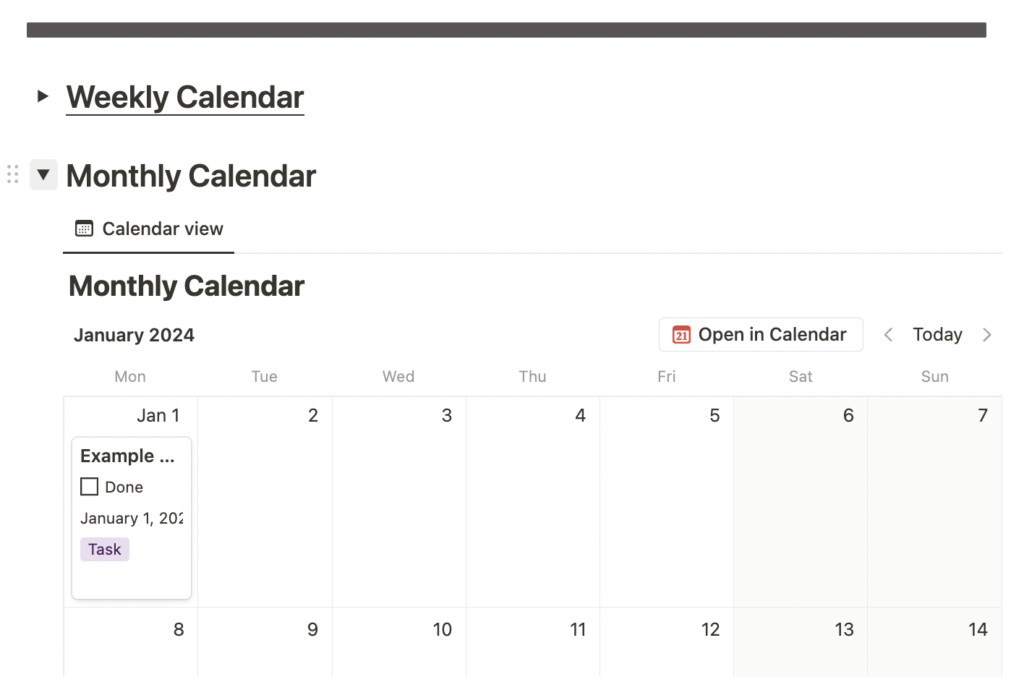
The Notion Weekly Planner has both Weekly View and Monthly View through toggles that you can expand or hide. (see image bellow)
.
The Weekly View of a Calendar will help you mindfully schedule all the events, tasks and appointments in a 7-day period at a time.
I’m a big fan of “get ahead” conceptso even if this is technically a weekly planner I also included a Monthly View of a Calendar so you can plan beyond the 7 days.
Both Calendar Views allow you to schedule events, appointments and even the important tasks that must be done on a particular day.
Week at a Glance
The Week at a Glance with a space for Meals is a powerful part of this planner that allows you to do the weekly planning with ease.

It has each day of the week and you can easily change it from Monday start to a Sunday Start.
Each day has a space for events and appointments, plus the top three most important tasks of the day.
Please don’t be put off by the limited space of the daily planner part of the week. It was intentional. It’s digital and of course, you can always add more, but it’s set to 3 most important tasks each day only to promote focus. You can always add another 3 tasks in a day after you finish the first 3 tasks.
Weekly Review
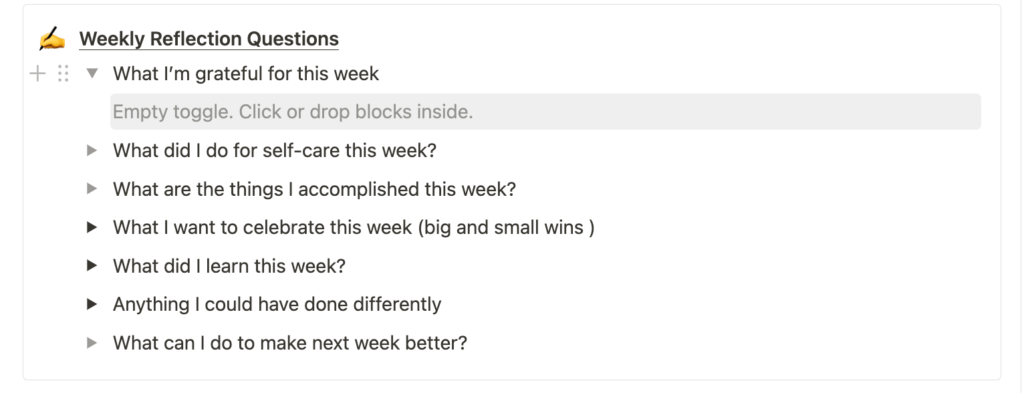
The Notion Weekly Planner has a Weekly Review Section to help you reflect on your achievements, challenges and lessons learned during the week. It also allows you to monitor your weekly progress.
Tips for using Notion Templates
Whenever you get a new template, make sure that you make a copy or a duplicate of the template first before using it. Set aside the original copy and play around with the duplicate.
Do this so you can experiment and practise using the template without any worry. You can always duplicate again the original copy if you need a fresh one.
Utilise the free resource on Youtube. If you search Notion, you’ll find a lot of tutorials. Just be intentional about it, otherwise you’ll spend hours and hours in the Notion rabbit hole.
My favourite Notion Expert is Thomas Frank I’m grateful for all his tutorials.
Don’t be afraid to play around with the template. Use it. Mess it up. Then reset and practise more.
If you’re new, aim for simple blocks and databases. Don’t worry about formulas and automation yet.
Resources
Create your free Notion Account here.
Click this link for more Notion Help and Tutorial
How to set up Notion: The Ultimate Guide
Start creating your intentional week
Go ahead and download your Free Intentional Week Planner in Notion.
Plan your intentional life one week at a time, stay focused, and create steady progress.


